Model 10 · Network
The Blockspace Market
Why fees rise and fall, and how miners fill a block.
Explanation level
How to use this model
How to use this modelWhat you see, what you can touch, what changes, what to take away
What am I looking at?
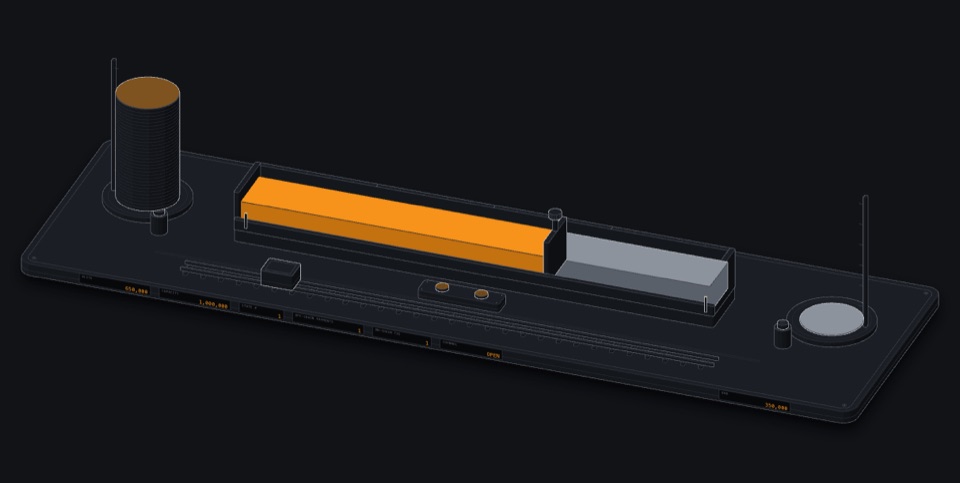
A transparent transaction reservoir of differently sized containers feeding a mechanical block assembler bounded by the block-weight limit.
What can I touch?
- Add transactions
- Adjust fee rates
- Increase congestion
- Change sizes
What happens when I change something?
Add congestion or change fee rates and the next block is refilled by (package) fee rate; low-fee transactions wait, and RBF or CPFP can move one forward.
What should I understand afterwards?
Explain why limited block space creates a fee market.
Understand why fees exist.
Limited seats on a train; people bid for them.
After this you can
- Explain why limited block space creates a fee market.
Experiment with congestion and fee rates.
Flood the reservoir, watch the cutoff rise.
After this you can
- Predict which transactions make the next block under congestion.
Explore package selection, dependencies, vsize and mempool policy.
Ancestor-score selection under 4 M WU.
After this you can
- Explain how CPFP raises a package's effective fee rate.
Open the model in its own window · works offline once loaded
Missions operate the model to complete them
-
Just enough fee
IntermediateCompletedChoose a fee rate that gets into the next block under congestion, without overpaying.
Your task: Raise congestion to at least 80 %, then add your payment at a fee rate that makes the next block but is no more than 2 sat/vB above the lowest rate the miner still includes.
Use: Increase congestion · Add transactions · Adjust fee rates · Observe miner selection
Miners usually fill a block with the highest-fee-rate packages first (a transaction together with its unconfirmed parents), so under congestion the next-block cutoff rises. Paying just above it gets you in; paying far above it only gives the miner more. New arrivals can still move the cutoff before a block is found.
Missions are checked from the model's own simulation state, not from clicks. No time limit. Completion is stored only in this browser. The quiz questions in the learning paths remain available.
Tutor Ask a question, or let the tutor show you around
The tutor answers by explaining and, within the permissions below, by operating this model. Every change it makes is shown and listed, and you can undo it. It cannot run code, read your browser data or see anything secret. The page works the same without it.